
Google Pics could make everyday visual design considerably easier for Workspace users, but its biggest advantage may be putting AI creation and editing directly inside tools people already use.
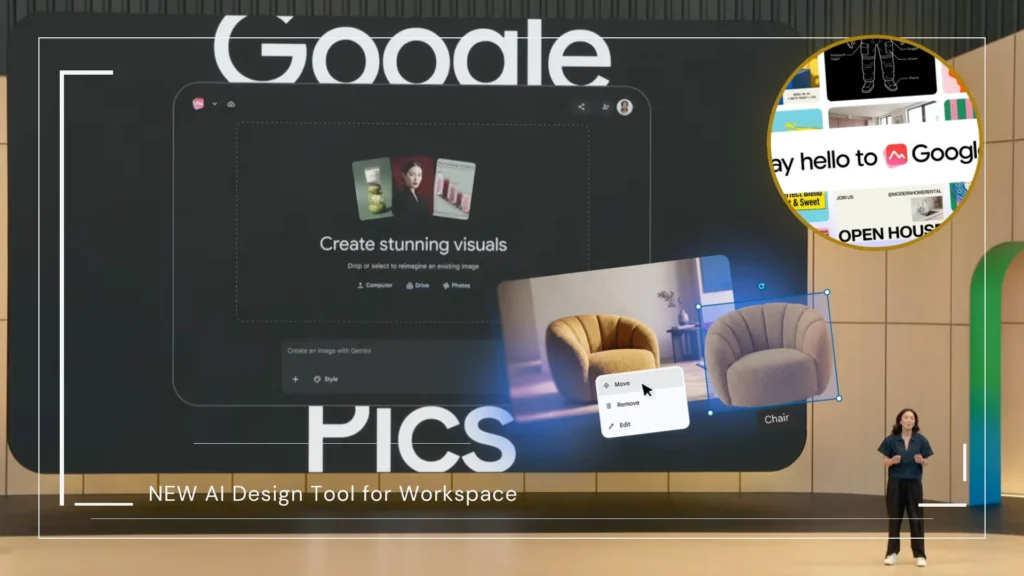
Google has launched Google Pics, a new AI-powered image creation and editing tool designed for producing posters, social media graphics, illustrations and other visual content using text prompts and precision editing controls.
Announced on September 1, 2026, Google Pics is beginning to roll out to eligible Google Workspace customers as well as Google AI Pro and Ultra subscribers.
The tool is powered by Google’s Nano Banana image generation and editing model and can work as a standalone app or alongside Workspace products including Google Docs, Slides and Drive.
Key Facts
| Detail | Information |
|---|---|
| Product | Google Pics |
| Announced | September 1, 2026 |
| Purpose | AI image generation and editing |
| AI model | Google Nano Banana |
| Initial integrations | Google Docs and Slides |
| Drive integration | Rolling out in the coming weeks |
| Eligible personal plans | Google AI Pro and Ultra |
| Eligible Workspace plans | Business Standard, Business Plus, Enterprise Standard and Enterprise Plus, plus Google AI Pro for Education |
What Is Google Pics?
Google Pics is Google’s new AI-first image creation and editing application for Google Workspace.
Users can start with an existing image imported from a computer, Google Drive or Google Photos, or create an image from scratch by describing what they want in a text prompt. The tool can then generate multiple alternatives and let users refine individual parts of the image instead of repeatedly regenerating the entire design.
Google says Pics can be used for tasks including marketing graphics, social media posts, product concepts, flyers, business cards and other digital or print assets.
TechCrunch characterized the product as Google’s answer to design services such as Canva and Adobe Express, although Google itself is positioning Pics more broadly as an AI image creation and editing tool integrated with Workspace.
What Can Google Pics Do?
1. Create Images From Text Prompts
Instead of requiring users to build every element manually, Pics can generate visual content from written instructions using Google’s Nano Banana model.
Google says the system can return several variations from the same prompt, allowing users to choose the result they prefer.
2. Edit Individual Objects
One of the more useful features is object-based editing.
Pics can isolate an individual object in an image and let the user move, resize, transform or modify it without changing the entire picture. Users can also request targeted edits to specific areas and apply multiple changes at once.
3. Edit and Translate Text Inside Images
Google Pics can modify, reformat or translate text that already appears within an image.
That could be particularly useful for businesses creating versions of marketing materials for different countries or languages without rebuilding the original artwork.
4. Crop and Upscale Images
Google says Pics includes cropping options for web, social media, print and other formats and can upscale images to 2K or 4K resolution. It also allows users to reverse unwanted changes.
5. Collaborate With Other Users
Because Pics is part of Google Workspace, images can be shared with other people for collaborative editing.
Users can also save and open Pics projects through Google Drive.
Which Google Users Are Getting Google Pics?
Google says Pics is rolling out to customers on Business Standard, Business Plus, Enterprise Standard and Enterprise Plus Workspace plans.
It is also being made available to people with Google AI Pro and Google AI Ultra personal subscriptions, along with customers using Google AI Pro for Education.
Google separately says the rollout to AI Pro, AI Ultra and most Workspace business customers will continue over the coming weeks, meaning availability may not appear for every eligible account immediately.
How Does Google Pics Work With Docs, Slides and Drive?
Workspace integration could be one of Google Pics’ most important advantages.
Google says users can select an image inside Google Docs or Google Slides and open Pics’ AI editing capabilities without moving the file into a separate application or browser tab.
Integration with Docs and Slides begins with the launch, while deeper Google Drive support is expected to roll out over the coming weeks. Google says users will eventually be able to open and edit nearly any image stored in Drive with Pics directly.
The standalone tool can also be accessed through pics.new.
Why Does Google Pics Matter?
Google Pics puts the company into more direct competition with visual-creation platforms such as Canva and Adobe Express, but Google is approaching the category from an AI-first direction.
Instead of requiring users to start with templates and manually arrange every design element, Pics can create the initial visual from a prompt and then expose individual objects for further editing.
More importantly, Google already has a large base of people working inside Docs, Slides and Drive.
If users can create and modify graphics without leaving those applications, Pics could reduce the need to move between a dedicated design service and Workspace simply to produce everyday business visuals.
That may make the service especially appealing to people who need graphics but do not consider themselves professional designers.
What Should Users Do?
Eligible Google AI and Workspace subscribers can check for access by visiting pics.new.
If Pics is not yet available on an eligible account, there may be nothing to fix. Google describes the launch as a phased rollout that will continue over the coming weeks.
Workspace users should also watch for Pics editing controls inside Docs and Slides. Google Drive integration is expected to expand later.
Sebertech Analysis
The more significant part of Google Pics may not be its ability to generate images as plenty of AI products can already do that.
Google’s stronger play is combining generation, object-level editing and collaboration with Workspace.
A business user preparing a presentation, for example, could generate a product graphic, alter individual elements, translate embedded text and place the finished image into Slides without relying on several separate creative applications.
That workflow gives Google a distribution advantage that standalone AI image generators do not automatically have.
Calling Pics a direct Canva replacement would still be premature, however.
Canva offers a much broader design platform covering templates, presentations, websites, video, branding tools and other workflows. Google Pics currently has a narrower focus on AI-powered image creation and editing.
What Is Still Unknown?
Google has not said whether Pics will eventually become available to free Google accounts or lower-tier Workspace subscriptions.
It also remains unclear how extensively the product will expand beyond image-focused creation into the broader range of design formats offered by established platforms such as Canva.
Because the rollout is phased, the exact date when every eligible subscriber will receive access may also vary.
What Happens Next?
Google will continue rolling out Pics to eligible AI Pro, AI Ultra and Workspace customers over the coming weeks.
Docs and Slides integrations are beginning first, with additional Google Drive functionality expected afterward.
How quickly businesses and individual creators adopt those integrations will help determine whether Pics develops into a broader competitor to established design platforms or primarily becomes an AI image editor embedded within Google Workspace.
Sources
- Primary source: Google Workspace: Google Pics announcement | Google: “Try Google Pics: Easy image creation and editing in Google Workspace.”
- Secondary source: TechCrunch: “Google’s answer to Canva is an AI tool where you prompt instead of design.”
Author: Grace Hisona
Published: September 2, 2026
