
Google Pixel phones are getting a new “Disco” custom icon style, giving users another way to change the look of their home screen.
The new Pixel icon style gives supported app icons a disco-ball effect on a dark background. It joins Google’s other custom icon styles, including Scribbles, Cookies, Stardust, Easel and Treasure.
For Pixel users who like loud home screen setups, this one is hard to miss.
Google Turns A Social Media Joke Into A Pixel Feature
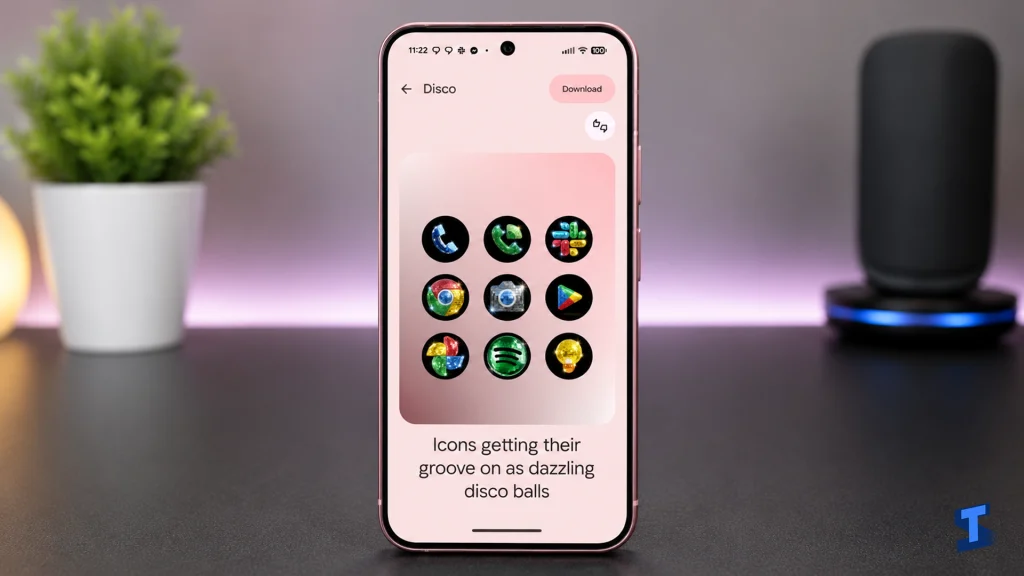
The Disco icon style started as a social media idea before becoming an actual Pixel feature.
After disco-inspired app icons began circulating on X, Google’s Android ecosystem president Sameer Samat joined the conversation and asked whether the icon pack should happen on Android.
Now, the feature is rolling out to Pixel phones.
Samat later confirmed on X that Disco icons are available on Pixel, jokingly asking users whether they were still sure they wanted the look.
What The Disco Icons Look Like
The Disco icon style makes app icons look like shiny disco balls.
Each icon appears with a reflective tile-like effect, usually set against a black background. The result is playful, flashy and very different from Google’s usual clean Material You design language.
It is not a subtle look. And that is probably the point.
For some users, it will make the Pixel home screen more fun. For others, it may look too busy compared to the simpler themed icons Android users are used to.
How Pixel Custom Icons Work
The Disco style is part of Pixel’s custom icons feature.
Instead of using a traditional third-party icon pack, Pixel’s system uses AI-generated recreations of app icons. Users can choose from different preset styles and then customize the look with color palette options.
Your wish is our command. Disco icons available on Pixel as of today.
— Sameer Samat (@ssamat) May 22, 2026
… Are y'all sure you still want this ?? 😅@DurvidImel @RaceJohnson https://t.co/S9dwLZRtHl pic.twitter.com/nvevL7fTSb
That gives Pixel owners a quick way to change their home screen without downloading a separate launcher or icon pack.
The feature was added earlier this year as part of Google’s Pixel Feature Drop, and Disco is now the newest style in the lineup.
Why This Pixel Update Is Getting Attention
The Disco icon rollout is small compared to major Android updates, but it shows where Google is taking Pixel customization.
For years, Android users had more freedom than iPhone users when it came to launchers, icons and home screen design. Pixel phones, though, have often kept customization more controlled and minimal.
The new custom icon styles are Google’s attempt to make Pixel personalization easier for everyday users.
You do not need to install a launcher. You do not need to search for icon packs. You can just pick a style and apply it.
Some Pixel Fans May Still Want More Control
The Disco icons are fun, but they may not satisfy users who want full Android-level customization.
Because the feature depends on Google’s built-in custom icon system, it is still more limited than using a full third-party launcher or a traditional icon pack.
The upside is convenience. The downside is control.
That trade-off may define how Pixel users feel about the feature. It is simple and polished, but not as flexible as classic Android theming.
The New Pixel Icons Are Rolling Out Now
The Disco icon style is rolling out now to supported Google Pixel phones.
Users who already have Pixel’s custom icons feature should check their customization settings to see whether the new style is available. As with most Google rollouts, availability may appear gradually across devices and regions.
For now, Pixel owners have one more way to make their home screen look different. Whether that is stylish or chaotic depends on how much disco energy you want on your phone.
via: 9to5Google
